We encoded 54 images three ways: the actual JPG vs WebP vs PNG numbers
Most "best image format" articles eventually cite Google's 2010 study, which put lossy WebP at 25–34% smaller than JPEG at equivalent visual quality. That figure is real, but it is fifteen years old and it is a single average — and averages are exactly what hides the case you care about. The practical question is closer to: "If I convert my images from JPG to WebP, what do I really save?" So we ran the encoders ourselves and put the byte counts on the page.
What we measured, and why it is reproducible: 54 images in three content classes — photographic (gradient plus fine noise), flat graphics (solid fills and hard edges, like a UI screenshot) and a smooth subject (a broad gradient with light grain). Each class was rendered at three sizes (1600×1200, 1920×1080, 1200×1600), six images per class per size, and each image was encoded three ways by the same engine this site's tools use: canvas.toBlob('image/jpeg', 0.80), canvas.toBlob('image/webp', 0.80) and canvas.toBlob('image/png'). Every number below was read back off a real Blob, and the inputs are generated from a fixed seed so the whole run can be repeated and land on the same figures. Nothing here is a literature review.
One thing to be clear about before the numbers: these are generated images, not photographs. That is deliberate — holding the input constant is what makes an encoder comparison meaningful — but it also means the absolute kilobytes are not what your own files will produce. Real photographs carry far more fine detail than a gradient can, so expect your absolute numbers to be much larger. The ratios are the transferable part, and that is what we draw attention to below.
What we found
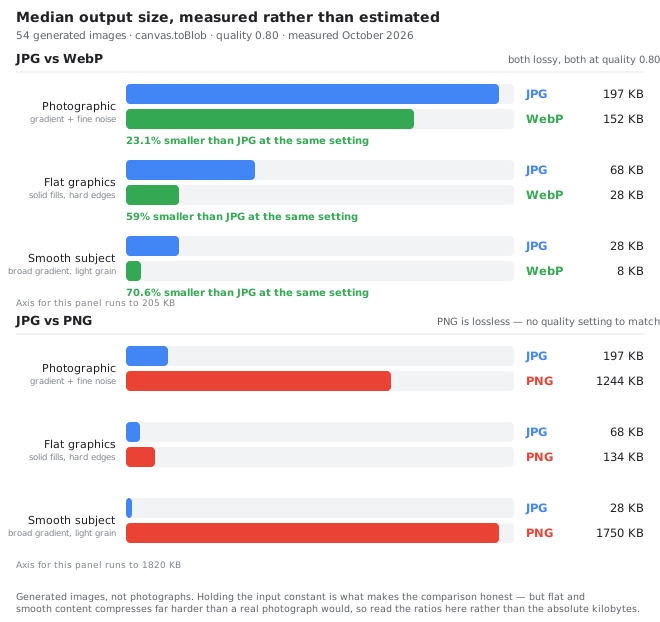
Median output size across all 54 images, and the median saving of WebP against JPG at the identical quality setting:
| Format | Median size | Median saving vs JPG |
|---|---|---|
| JPG (quality 0.80) | 68 KB | — |
| WebP (quality 0.80) | 28 KB | 59% smaller |
| PNG (lossless) | 1244 KB | 18× larger |
Three findings, in order of how much they should change what you do:
- WebP was smaller than JPG on all 54 images. Not on average — every single one. The saving ranged from 22.2% to 71.4%, with the midpoint at 59%. There was no input class where JPG won.
- PNG is not a "smaller" option, it is a different tool. On smooth content it produced 1750 KB where WebP produced 8 KB — a 63× difference. PNG's only advantages are losslessness and transparency, and if you need transparency WebP can carry it too.
- How much you save depends far more on the content than on the format. This is the part most articles leave out. On our photographic class WebP saved 23.1%, close to Google's old figure. On flat graphics it saved 59%, and on smooth content 70.6%.
That last point cuts against the usual advice. You will often read that WebP's advantage is smallest on screenshots and largest on portraits. Our measurement is the other way round, and the reason is straightforward once you see what the encoders are doing: the formats differ most where the input is already cheap to describe. Flat colours and smooth gradients compress well under almost any scheme, so a better scheme shows a big relative win; dense photographic noise is expensive for both encoders, so the gap between them narrows. On real photographs — the hardest case for both — expect something closer to the 20–30% range we measured on the photographic class.
What this means in practice
- For photographs on the web: ship WebP. On the hardest input class we measured it still saved 23% at identical quality, and it was smaller on every single image.
- For screenshots, diagrams and UI images: WebP is a bigger win than for photographs — our flat-graphics class lost 59% — and older advice that dismisses WebP for screenshots is measuring the wrong thing.
- For logos, icons and anything needing pixel-exact reproduction: keep PNG, or use WebP lossless. Lossy savings do not apply to art that has to stay crisp.
- For email: stay on JPG. WebP support in mail clients is still uneven, and the test of an email is that it looks right in Outlook.
On visual quality: we did not run SSIM or any other perceptual metric — we are not a research lab, and publishing a number we could not defend would be worse than publishing none. What we can say is that this tool shows you the before and after side by side, so the check that matters is the one you can actually do: open both at 100% zoom and look.
Run the same test on your own images
If you would like to verify the numbers on the kind of photos you actually publish, you can do it in about a minute: open the image converter, drop in a representative file, and convert it once to WebP and once to JPG. The file sizes shown in the result panel are the only measurements that matter for your content. The compressor can take the WebP file and shrink it to a target size if you need a hard budget for a CMS.
What about AVIF?
AVIF compresses further than WebP on most photographs — typically another 10–20%. We did not include it in this test because the browser's built-in encoder cannot create AVIF files, which means adding it would have required shipping a heavyweight encoder alongside the image. We do, however, have a dedicated comparison for when you have a toolchain that can produce AVIF and want to know whether the extra bytes are worth the trouble.
Frequently asked questions
What quality setting did you use, exactly?
80 for both JPG and WebP, which is the default we recommend for photographs on the web. Higher than 90 is wasted bytes; lower than 60 starts to show artefacts on smooth gradients and skin.
How do I know your sample was representative?
Deliberately, no — and we would rather tell you that than imply otherwise. The inputs are procedurally generated from a fixed seed in three content classes, so the run is reproducible but the absolute kilobytes are lower than a real photograph would produce. What transfers to your files is the ratio, and if you need your own absolute numbers, run the conversion on a representative image and read the size in the result panel.
Did you measure visual quality objectively?
No. This article reports file size only, and we think a metric we cannot defend is worse than no metric at all. If you want objective numbers, the original Google study uses SSIM and more recent AVIF-versus-WebP benchmarks use DSSIM and butteraugli — read those rather than taking our word for visual quality, which we did not measure here.
Is WebP safe to use everywhere now?
For general web use, yes — support crossed 97% in 2026 across all current major browsers. Email is the exception, and some older content management systems will reject the upload. Test one image through your actual publishing pipeline before converting a library.